

CloudFormation
Introduction
Section titled “Introduction”CloudFormation is a service provided by Amazon Web Services (AWS) that allows you to define and provision infrastructure as code. It enables you to create, update, and manage resources in a repeatable and automated manner using declarative templates. With CloudFormation, you can use JSON or YAML templates to define your desired infrastructure state. You can specify resources, their configurations, dependencies, and relationships in these templates.
LocalStack supports CloudFormation, allowing you to use the CloudFormation APIs in your local environment to declaratively define your architecture on the AWS, including resources such as S3 Buckets, Lambda Functions, and much more. The API Coverage section and feature coverage provides information on the extent of CloudFormation’s integration with LocalStack.
Getting started
Section titled “Getting started”This guide is designed for users new to CloudFormation and assumes basic knowledge of the AWS CLI and our awslocal wrapper script.
Start your LocalStack container using your preferred method. We will demonstrate how to deploy a simple CloudFormation stack consisting of a single S3 Bucket with the AWS CLI.
Create a CloudFormation Stack
Section titled “Create a CloudFormation Stack”CloudFormation stack is a collection of AWS resources that you can create, update, or delete as a single unit.
Stacks are defined using JSON or YAML templates.
Use the following code snippet and save the content in either cfn-quickstart-stack.yaml or cfn-quickstart-stack.json, depending on your preferred format.
Resources: LocalBucket: Type: AWS::S3::Bucket Properties: BucketName: cfn-quickstart-bucket{ "Resources": { "LocalBucket": { "Type": "AWS::S3::Bucket", "Properties": { "BucketName": "cfn-quickstart-bucket" } } }}Deploy the CloudFormation Stack
Section titled “Deploy the CloudFormation Stack”You can deploy the CloudFormation stack using the AWS CLI with the deploy command.
The deploy command creates and updates CloudFormation stacks.
Run the following command to deploy the stack:
awslocal cloudformation deploy \ --stack-name cfn-quickstart-stack \ --template-file "./cfn-quickstart-stack.yaml"You can verify that the stack was created successfully by listing the S3 buckets in your LocalStack container using the ListBucket API.
Run the following command to list the buckets:
awslocal s3api list-bucketsDelete the CloudFormation Stack
Section titled “Delete the CloudFormation Stack”You can delete the CloudFormation stack using the delete-stack command.
Run the following command to delete the stack along with all the resources created by the stack:
awslocal cloudformation delete-stack \ --stack-name cfn-quickstart-stackResource Browser
Section titled “Resource Browser”The LocalStack Web Application provides a Resource Browser for managing CloudFormation stacks to manage your AWS resources locally. You can access the Resource Browser by opening the LocalStack Web Application in your browser, navigating to the Resources section, and then clicking on CloudFormation under the Management/Governance section.
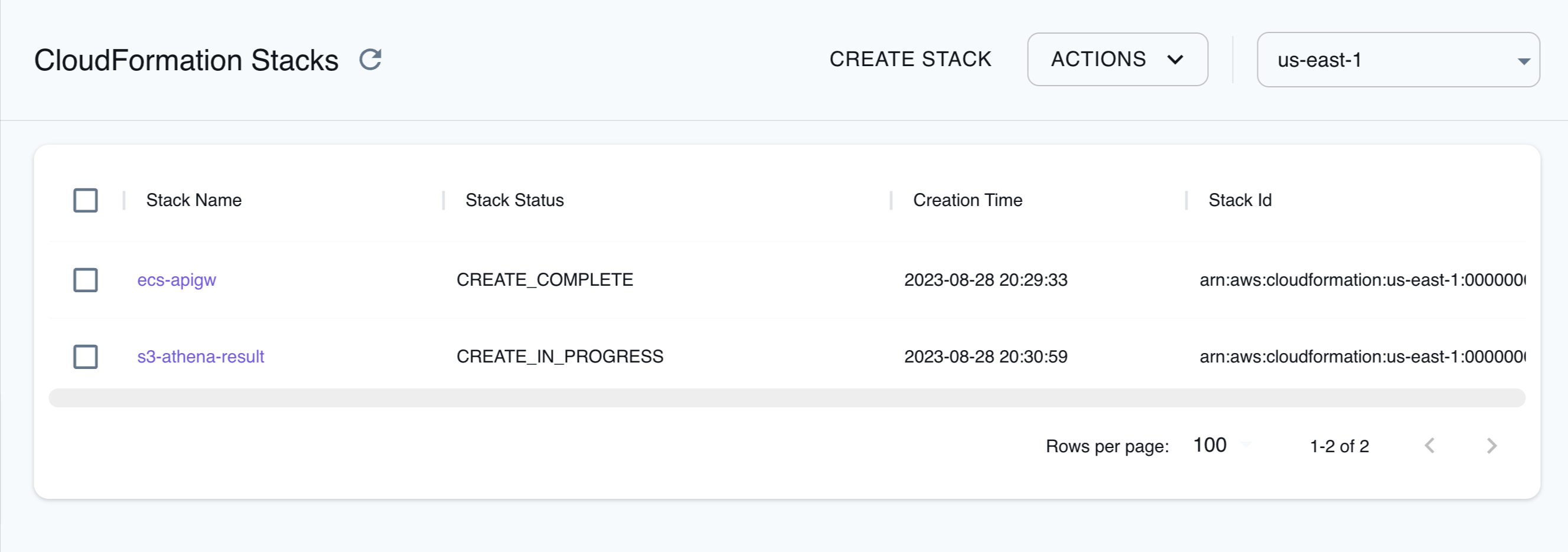
The Resource Browser allows you to perform the following actions:
- Create Stack: Create a new CloudFormation stack by clicking on Create Stack and provide a template file or URL, including the stack name and parameters.
- Edit Stack: Edit an existing CloudFormation stack by clicking on Edit Stack and editing the stack name and parameters and clicking on Submit.
- View Stack: View an existing CloudFormation stack by clicking on the Stack Name and viewing the stack details, including the stack name, status, and resources.
- Delete Stack: Delete an existing CloudFormation stack by clicking on the Stack Name and clicking on Actions and then Remove Selected.
Examples
Section titled “Examples”The following code snippets and sample applications provide practical examples of how to use CloudFormation in LocalStack for various use cases:
- Serverless Container-based APIs with Amazon ECS & API Gateway
- Deploying containers on ECS clusters using ECR and Fargate
- Messaging Processing application with SQS, DynamoDB, and Fargate
Best practices
Section titled “Best practices”CloudFormation templates that target both real AWS and LocalStack should avoid hardcoded values that differ between the two environments. Using pseudo parameters and intrinsic functions keeps a single template portable without conditional logic or environment-specific parameter overrides.
Use AWS::URLSuffix for service domain names
Section titled “Use AWS::URLSuffix for service domain names”Hardcoding amazonaws.com (or conversely localhost.localstack.cloud) when building service URLs is one of the most common causes of templates that deploy on AWS but fail on LocalStack, or vice versa.
This typically shows up in API Gateway invoke URLs, Step Functions API integration targets, and other places where a template constructs a fully qualified endpoint.
The AWS::URLSuffix pseudo parameter resolves to amazonaws.com on AWS (or amazonaws.com.cn in China Regions) and to the configured LOCALSTACK_HOST on LocalStack, which defaults to localhost.localstack.cloud.
Referencing it lets the same template produce a valid URL in either environment.
Avoid hardcoding the AWS suffix:
Outputs: ApiUrl: Value: !Sub "https://${MyApi}.execute-api.${AWS::Region}.amazonaws.com/${StageName}"Reference AWS::URLSuffix instead:
Outputs: ApiUrl: Value: !Sub "https://${MyApi}.execute-api.${AWS::Region}.${AWS::URLSuffix}/${StageName}"The same pattern applies when wiring an API Gateway stage into a Step Functions task, when building a WebSocket invoke URL, or any other integration Uri that embeds a service domain.
The LocalStack team contributed this practice upstream to the AWS SAM application templates and to the AWS serverless patterns collection that backs serverlessland.com/patterns and the VS Code Application Builder.
Use AWS::Partition when building ARNs
Section titled “Use AWS::Partition when building ARNs”Prefer composing ARNs with AWS::Partition, AWS::Region, and AWS::AccountId rather than embedding a literal arn:aws:... prefix.
The resulting template also works on AWS GovCloud and AWS China without changes:
ManagedPolicyArns: - !Sub "arn:${AWS::Partition}:iam::aws:policy/service-role/AmazonAPIGatewayPushToCloudWatchLogs"Reference resources with !Ref and Fn::GetAtt
Section titled “Reference resources with !Ref and Fn::GetAtt”When one resource needs the address of another, read it from the resource itself with !Ref or !GetAtt rather than constructing the URL from service domains.
For example, use !GetAtt MyQueue.QueueUrl or !GetAtt MyBucket.DomainName so LocalStack returns the local endpoint while AWS returns the real one.
Feature coverage
Section titled “Feature coverage”Features
Section titled “Features”| Feature | Support |
|---|---|
| Parameters | Partial |
| Dynamic References | Full |
| Rules | - |
| Mappings | Full |
| Conditions | Full |
| Transform | Full |
| Outputs | Full |
| Custom resources | Partial |
| Drift detection | - |
| Importing Resources | - |
| Change sets | Full |
| Nested stacks | Partial |
| StackSets | Partial |
| Intrinsic Functions | Partial |
Intrinsic Functions
Section titled “Intrinsic Functions”| Intrinsic Function | Supported | Explanation |
|---|---|---|
Fn::And | Yes | Performs a logical AND operation on two or more expressions. |
Fn::Or | Yes | Performs a logical OR operation on two or more expressions. |
Fn::Base64 | Yes | Converts a binary string to a Base64-encoded string. |
Fn::Sub | Yes | Performs a string substitution operation. |
Fn::Split | Yes | Splits a string into an array of strings. |
Fn::Length | Yes | Returns the length of a string. |
Fn::Join | Yes | Joins an array of strings into a single string. |
Fn::FindInMap | Yes | Finds a value in a map. |
Fn::Ref | Yes | References a resource in the template. |
Fn::GetAtt | Yes | Gets an attribute from a resource. |
Fn::If | Yes | Performs a conditional evaluation. |
Fn::Import | Yes | Imports a value from another template. |
Fn::ToJsonString | No | Converts an object or map into a json string. |
Fn::Cidr | No | Generates a CIDR block from the inputs. |
Fn::GetAZs | No | Returns a list of the Availability Zones of a region. |
Pseudo Parameters
Section titled “Pseudo Parameters”Pseudo parameters are built-in variables that CloudFormation resolves at deployment time.
You can reference them with the Ref intrinsic function (for example, !Ref AWS::Region) or with Fn::Sub (for example, !Sub "${AWS::Region}").
LocalStack resolves each pseudo parameter to the equivalent value for the local environment, which lets the same template deploy against both AWS and LocalStack.
| Pseudo Parameter | Supported | Value in LocalStack | Value in AWS |
|---|---|---|---|
AWS::AccountId | Yes | The account ID used by the stack (default: 000000000000) | The AWS account ID of the account deploying the stack |
AWS::NotificationARNs | Partial | Empty list | The list of SNS topic ARNs passed to the stack via --notification-arns |
AWS::NoValue | Yes | Removes the corresponding property when used as a return value in Fn::If | Same |
AWS::Partition | Yes | aws | aws, aws-cn, or aws-us-gov depending on the Region |
AWS::Region | Yes | The Region of the encompassing resource | Same |
AWS::StackId | Yes | The ARN of the stack | Same |
AWS::StackName | Yes | The name of the stack | Same |
AWS::URLSuffix | Yes | The configured LOCALSTACK_HOST (default: localhost.localstack.cloud) | amazonaws.com, or amazonaws.com.cn in China Regions |
Resources
Section titled “Resources”| Resource Type ▲ | Service ▲ | Create | Delete | Update |
|---|---|---|---|---|
API Coverage
Section titled “API Coverage”| Operation ▲ | Implemented ▼ | Verified on Kubernetes |
|---|